# Applications
# VS Code Configuration
# Global
## Raccourci clavier
Sous linux, il se peut que les raccourcis claviers divergent de la langue locale du système. Pour cela, il faut modifier un paramètre de VS Code.
https://github.com/Microsoft/vscode/wiki/Keybinding-Issues#troubleshoot-linux-keybindings
# Docker
# Custom format output (GO template)
https://docs.docker.com/config/formatting/
In CLI
```shell
'{{ .ID }}\t{{.Image}}\t{{ .Names }}'
```
Or directly in `.docker/config.json` :
```shell
{
"psFormat": "table {{.ID}}\\t{{.Image}}\\t{{.Status}}\\t{{.Names}} ({{.Ports}})"
}
```
# Bash
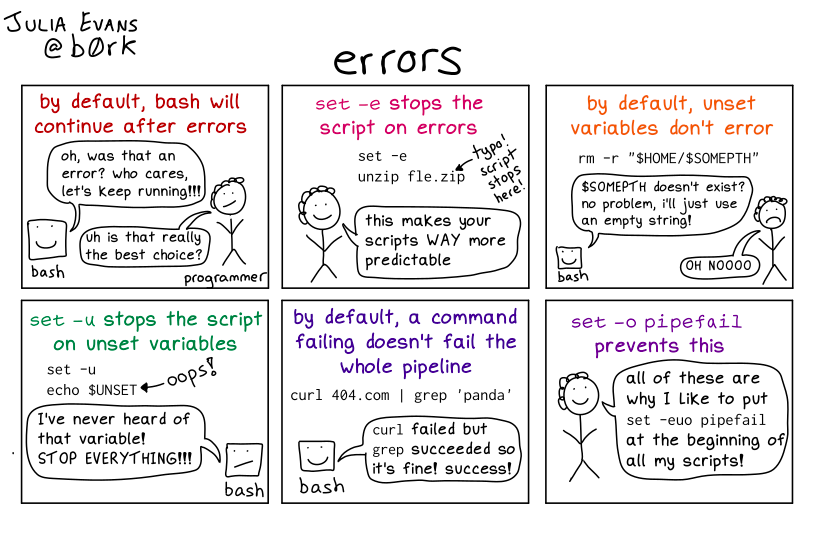
# How to use correctly error-handling
```shell
set -euo pipefail
```
[](https://biblio.pijiw.ca/uploads/images/gallery/2021-09/VDA2l1fVTZofM0jM-image-1631722352300.png)
# Bash profile
# Bash profile customization
Run this :
`bash -c "$(curl -fsSL https://raw.githubusercontent.com/ohmybash/oh-my-bash/master/tools/install.sh)"`
# SSH
# SSH Overview
## Generate a secure SSH key
*ED25519 requires OpenSSH v6.5*
```bash
ssh-keygen -t ed25519 -a 100 -f ~/.ssh/id_ed25519_admin -C "{my-email@domain.tld}"
```
You might need a second RSA key because ED25519 uses the OpenSSH format to save the private key. This new format is supported from OpenSSH v6.5.
```bash
ssh-keygen -t rsa -b 4096 -a 100 -f ~/.ssh/id_rsa_admin -C "{my-email@domain.tld}"
```
### Information
Read a private key and output the public key (e.g. to validate the password) :
```bash
ssh-keygen -y -f ~/.ssh/id_ed25519_admin
```
## SSH-Agent Configuration with KeepassXC
### GNOME
Gnome keyring is used by default.
```bash
# Check the status of the service
systemctl --user status gnome-keyring-daemon.s*
```
Disable it if you want to use the ssh-agent service.
### KDE Plasma
Use the ssh-agent service offered with openssh.
```bash
# Enable the service
systemctl --user enable ssh-agent.service
# Configure env var for user session
mkdir -p ~/.config/environment.d
cat << EOF > ~/.config/environment.d/ssh_auth_socket.conf
SSH_AUTH_SOCK="\${XDG_RUNTIME_DIR}/ssh-agent.socket"
EOF
# Stop and disable the GNome Keyring Daemon if enabled
systemctl stop gnome-keyring-daemon.socket gnome-keyring-daemon.service
sudo systemctl --global disable gnome-keyring-daemon.socket
```
\[https://wiki.archlinux.org/title/SSH\_keys#Start\_ssh-agent\_with\_systemd\_user\]
\[https://devopstales.github.io/linux/ssh-credential-in-keepassxc/\]
## Ressources
https://risanb.com/code/upgrade-ssh-key-to-ed25519/
https://wiki.archlinux.org/title/SSH\_keys
https://dancroak.com/ssh-ed25519
https://tutox.fr/2020/04/16/generer-des-cles-ssh-qui-tiennent-la-route/
https://homputersecurity.com/2017/04/21/authentication-en-deux-etapes-sur-un-serveur-ssh-cle-publique-code-totp/
# WireGuard
# WireGuard
Blog with interesting articles
https://www.procustodibus.com/blog/
# NextCloud
# MariaDB Backup
# Commandes de base
## Informations
### Backing Up a Single Database
> mysqldump -u root -p database_name > database_name.sql
### Backing up all databases
> mysqldump -u root -p --all-databases > all-databases.sql
#### Append the date to te filename
> mysqldump -u root -p database_name > database_name_$(date +%F_%H-%M).sql
## MariaDB backup in Docker
```bash
source .env && docker-compose exec mariadb mysqldump -uroot -p${MARIADB_ROOT_PASSWORD} --all-databases > mariadb-dump-$(date +%F_%H-%M-%S).sql
```
## Ressources
# Configuration globale
# Apps
## Preview generator
Ajouter une tâche pour la génération des prévisualisations
```bash
```
# Gestion du pare-feu Linux
# FirewallD
[https://www.linuxtricks.fr/wiki/firewalld-le-pare-feu-facile-sous-linux](https://www.linuxtricks.fr/wiki/firewalld-le-pare-feu-facile-sous-linux)
[https://dev.to/soerenmetje/how-to-secure-a-docker-host-using-firewalld-2joo](https://dev.to/soerenmetje/how-to-secure-a-docker-host-using-firewalld-2joo)
[https://www.grottedubarbu.fr/docker-firewall/](https://www.grottedubarbu.fr/docker-firewall/)
# Docker
# Gestion des accès réseaux (local/internet)
# Gestion des réseaux
- Bridge normale
- Internal, pas de ports exposés
# Gestion des ports exposés
- Soit publique automatiquement
- Soit purement local ("127.0.0.1:3308:3306")
Nécessite un tunnel SSH
- Soit via manipulation du pare-feu
# Gestion des usagers
https://blog.giovannidemizio.eu/2021/05/24/how-to-set-user-and-group-in-docker-compose/